


FLEET PARTS INVENTORY FEATURES
Four Ways EKOS Simplifies Fleet Parts Inventory Management
01
Centralized Parts Catalog
Organize parts by part number, manufacturer, cost, and location.
02
Multi-Warehouse Inventory
Manage your parts inventory across multiple warehouses without added confusion.
03
Reorder Alerts
Set a reorder point per part per warehouse. EKOS flags low stock and out-of-stock so you can order more before you run out.
04
Auto-Deduct from WOs
When a technician adds a part to a work order, inventory decrements from the correct warehouse and the part cost flows to the work order automatically — zero double-entry.
FLEET PARTS CATALOG & STOCK DETAILS
A complete view of every stocked part
Get real-time fleet parts inventory visibility from one screen — stock levels by warehouse, reorder thresholds, manufacturer details, recent usage history, open purchase orders, and total inventory value — all without switching systems.

MULTI-WAREHOUSE
One Unified Parts Catalog. Inventory Tracked Across Every Location.
Run a main garage and three satellite shops? Or a service truck that's its own mobile warehouse? Each location keeps its own quantities and reorder points, while the catalog stays unified — so a brake pad is the same brake pad everywhere.

Per-warehouse quantity, bin location, and reorder point
Move stock between warehouses with full history
Roll up value across all locations or per warehouse


AUTOMATED PARTS INVENTORY TO WORK ORDER
Add a part to a job.
Inventory updates itself.
The moment a technician picks a part on a work order, EKOS deducts the unit from the right warehouse, posts the cost to the WO, and — if the threshold is crossed — fires a reorder alert. Zero double-entry.
01
Tech Adds Part to WO
Pick from any warehouse

02
EKOS Deducts Inventory
Stock decrements automatically

03
Cost Flows to WO
Unit cost auto-fills line item

04
Reorder Alert Fires
Quantity hit reorder point

DIGITAL PHYSICAL COUNT
Perform physical counts without paper and clipboards.
Count parts inventory by aisle, row, and bin using a digital workflow that replaces paper count sheets and manual re-entry. Whether you’re running a full physical count or a cycle count on high-turnover SKUs, inventory adjustments update automatically as each count is completed — no spreadsheet reconciliation required.

PURCHASE ORDERS & RECEIVING
Track parts orders from purchase to delivery.
Create purchase orders with parts, quantities, suppliers, and expected delivery dates, then receive inventory directly into the correct warehouse as shipments arrive.

Partial receiving — close individual PO lines as shipments arrive, not just full orders
Attach supplier quotes, packing slips, and tax certificates to each purchase order
See all open purchase orders directly from the individual part record
Track parts spend per supplier to identify your most reliable fleet parts vendors

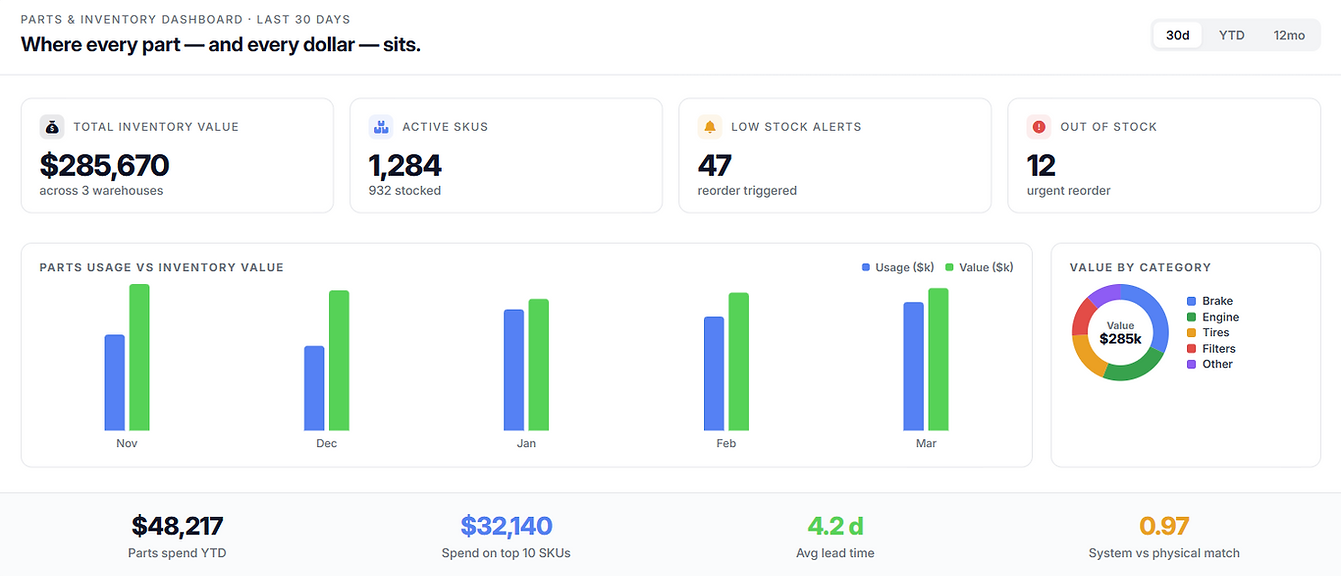
INVENTORY VALUE & COST VISIBILITY
Know what's on the shelf — and what it's worth.

Drill into any warehouse for total inventory value and your highest-turnover parts
Spot consumption trends to anticipate stockouts before they halt a repair
Compare parts cost vs. labor cost per work order to understand true repair costs
Fleet-wide parts spend reporting to identify where your parts budget is going
Get your shelves under control this week.
Start a free trial and we'll help you import your parts catalog, set reorder points, and run your first physical count before the month is out.