
FLEET WORK ORDER MANAGEMENT SOFTWARE
Stop Filling Out Paper, Start Tracking Every Repair
Create digital fleet work orders that automatically track parts, labor, and vendor costs from issue to completion. Customizable forms, one-click dispatch, and full cost visibility — connected to your parts inventory, PM schedules, and technician queue from day one.


FLEET WORK ORDER MANAGEMENT FEATURES
Four Things Every EKOS Fleet Work Order Does, By Default
01
Digital Work Orders
Create, assign, and manage repairs from one digital work order instead of paper forms and spreadsheets.
02
Technician Tracking
Track technician time, repair progress, notes, and status updates as work happens throughout the day.
03
Parts & Labor Tracking
Capture parts, labor, vendor costs, and service details automatically within every repair record.
04
Shop Visibility
See active repairs, completed work, downtime, and maintenance history from one live operational view.
WORK ORDER SERVICE TEMPLATES
Create service templates for common repairs.
A Service Item is a predefined task — oil change, brake inspection, tire rotation — with the parts and standard labor time already attached. Pick the item; EKOS fills in the parts list and the estimated hours. Mechanics stop typing the same thing 200 times a year.

Pre-attached parts list per service item
Standard labor time for estimated vs actual
Consistent classification across the garage
Oil change
3 parts · 0.6 hr
Cabin Filter
1 parts · 0.3 hr
Full B Service
9 parts · 3.0 hr
Battery
Replacement
9 parts · 3.0 hr
Brake inspection
0 parts · 0.4 hr
Annual DOT
1 parts · 1.5 hr
Tire Rotation
0 parts · 0.5 hr
Alternator
Replacement
9 parts · 3.0 hr

FLEET WORK ORDER WORKFLOW — ISSUE TO COMPLETION
Turn reported issues into completed repairs.
Driver reports, failed inspections, and PM reminders convert directly into fleet work orders — automatically. Issue context carries forward so technicians have everything they need before they touch the vehicle. Dispatch, repair, capture costs, and close — all in one place.
01
Issue Surfaces
Driver report, failed inspection, observation

02
Convert to WO
One click — issue context carries forward

03
Dispatch & Assign
Drag to a technician, set priority
04
Close & Track
Signature, totals, downtime captured

DISPATCH & ASSIGNMENT
See every technician’s workload in one place.
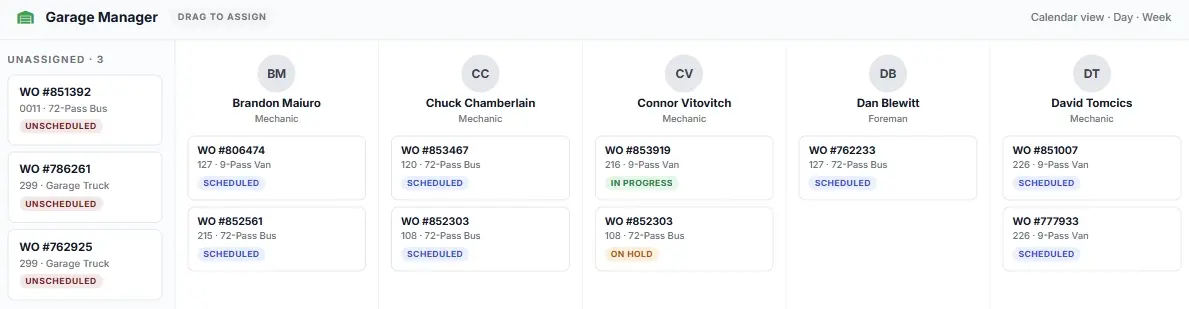
The EKOS Garage Manager gives you a single dispatch board for every unassigned work order and every technician’s live queue. Balance workloads visually — no spreadsheet juggling, no phone calls, no confusion.
IN-HOUSE & VENDOR WORK ORDER TRACKING
Track parts, labor, and vendor work in one place.
Add inventory parts, technician labor, outside vendor costs, invoices, and repair notes to a single work order without juggling multiple systems.
Inventory Parts
'Parts auto-deduct from fleet inventory the moment they’re added to a work order — costs flow in automatically
Vendor Work
'Track outsourced fleet repairs and vendor invoices on the same work order as in-house labor — one record per vehicle, no exceptions.
Costs & Billing
'Every work order closes with a complete cost summary — parts, labor, taxes, and vendor invoices — tied directly to the asset’s total cost of ownership.
FLEET WORK ORDER COST & PERFORMANCE REPORTING
Know where every dollar and every hour goes.

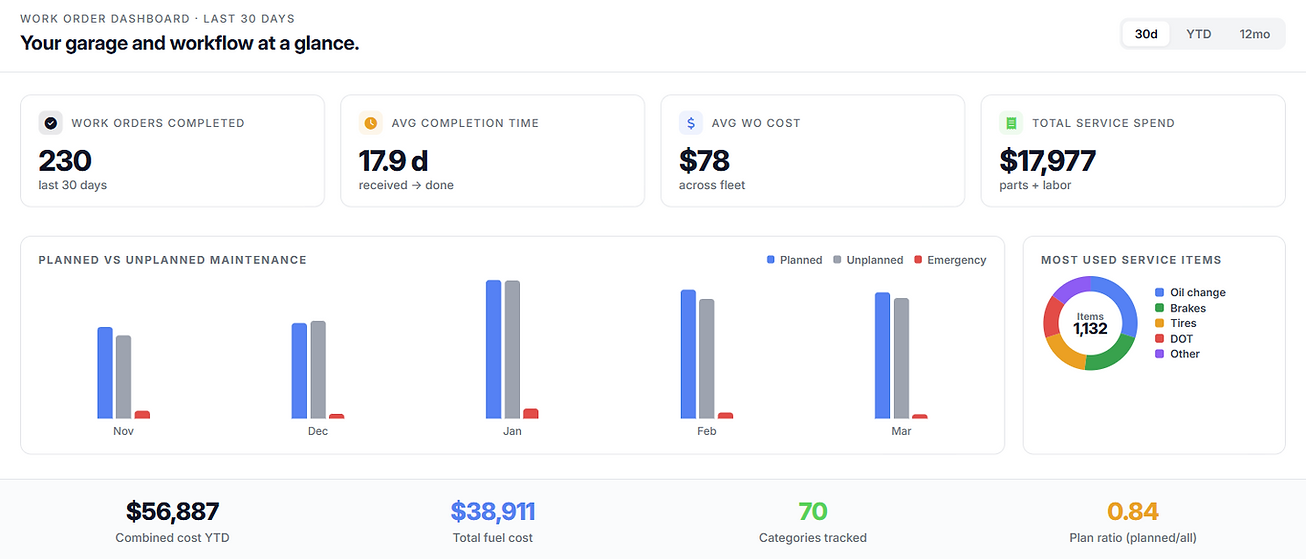
Drill into any month to see which fleet work orders drove the most cost
Planned vs. unplanned vs. emergency repair mix — understand your reactive maintenance ratio
Internal vs. external labor cost breakdown per vehicle, department, or time period
Link work order spend directly to asset total cost of ownership reporting
Run Your First Digital Fleet Work Order Today
Start a free trial and dispatch your first work order
before the day is out.